14 octobre 2009


Le nouveau site du W3C est en ligne


Le W3C inaugure son nouveau design, après plusieurs mois de travail. Cet organisme chargé de promouvoir les standards et la compatibilité des technologies du web (HTML, CSS, XML, RDF, PNG, SVG, DOM, SOAP, URL...) acquiert ainsi une nouvelle dynamique avec un site bien plus clair.


La présentation des rubriques et des documents est agréable à la lecture. On peut remarquer la présence d'un menu en haut de page pour modifier dynamiquement le style en version mobile et print. Les actualités occupent bien entendu le contenu central de la page d'accueil.


Nouveau design du site W3C


Le menu principal intitulé 'Standards' à juste titre s'articule autour des catégories suivantes :


On pourra noter que le site est délivré en XHTML 1.0 Strict, encodé en UTF-8, qu'il fait appel à plusieurs feuilles de styles CSS, dont certaines via media queries pour les navigateurs mobiles, et des sprites pour les icônes. Certains comportements JavaScript non obstrusifs sont adoptés pour raccourcir les listes dans les pages, et développer les contenus. Certaines sections ne sont pas encore à jour.

Urbanspoon Updated With Augmented Reality View


Urbanspoon [App Store, Free] has been updated to add an awesome shiny new augmented reality mode called 'Scope'. When viewing it on your device normally, it shows your location as a blue pin in Google Maps, and nearby restaurants in red pins. Aiming the camera at the horizon, however, causes it to switch over to a live camera feed with nearby restaurant locations layered over it.

11 octobre 2009


Scrum doesn’t do anything

Brilliant post!


“Doing Scrum” is as meaningless (and impossible) as creating an instance of an abstract class.  Scrum is a framework for surfacing organizational dysfunction.  It is not a process and it is not prescriptive.  The core framework of Scrum, as described (e.g.) here and here does not actually do anything.  It is, in a sense a contract we put in place between those seeking value and those building it.  But a contract doesn’t produce anything.  An interface is passive.  We need an implementation.
Scrum begins to work when people understand it well enough to create a concrete implementation, to emerge a process that is their own.  Understanding and respecting the Scrum framework and the set of rules allows you to become aligned with others, to have a common set of values and principles from which to operate.
Scrum itself can be thought of as similar to a set of game rules.  Think chess, think soccer.  The rules are easy to learn, and knowing them means you can play the game with others.  The rules are the ties that bind us together.  But just knowing the rules means nothing in terms of deriving pleasure from the game.  You need to play, to be involved.  It is doing, not knowing that brings about results.  To play well you need to develop strategy, and in team games you need to develop relationships, and trustful interactions.
In any game, once you start breaking the rules everything falls apart, and no one will want to play with you.  It is the same with Scrum.
So respecting the contract, the rules, or in software parlance, respecting the interface, allows you to create a process that suits your context — and your context is many things… people, industry, business, market place, product, location, language, physical environment, culture, people.  It starts and ends with people.  Scrum doesn’t actually do anything, people do things.  The Scrum process will emerge through the interaction of the people, and it will be different for each organization or team.  And this is where people trip up; too many think that creating their own process starts with breaking the rules.  It doesn’t.  Do that, and you have failed before you begin.
The Scrum process being created must operate within the agreed parameters, must be bounded by the rules.  All methods of the abstract class must be implemented, or the class won’t compile, won’t run.  Try to move your bishop in a straight line in a game of chess, and your opponent will leave the table.  Pick up the soccer ball and throw it and you’ll be red carded.
The framework of Scrum is a powerful mechanism for surfacing organizational and personal dysfunction.  It is that very power that causes people to try to circumnavigate the rules, to take shortcuts.  They don’t want to look.  But not looking doesn’t cause problems to go away or broken things to mend, it just delays the inevitable giant crash.  We don’t call out the value of courage in Scrum for nothing.
Comparing Scrum then to implementation practices such as XP or software craftsmanship makes little sense.  Each of these movements offers excellent tools for implementing a solid Scrum practice, for making the abstract concrete.  Scrum offers a strong framework and a relentless rhythm to shake out the dust of years.
You cannot “do Scrum” but you can certainly embrace it, and the more courageously you do so the stronger will be your emergent process.

From http://agileanarchy.wordpress.com/2009/10/11/scrum-doesnt-do-anything/

What is Agile?

9 octobre 2009


30+ Really Nice Nature Beauty iPhone Wallpaper

30+ Really Nice Nature Beauty iPhone Wallpaper

8 octobre 2009


15 Time Saving CSS Tools You Should Be Aware Of


CSS is the essential component of modern web design. But writing the CSS code from scratch for each web design project is a tiring and time-consuming job. Here are 15 CSS tools ranging from layout generators, form generators to code compressors that will save you a lot of time writing the CSS code for your next web design.

1. CSS Typeset


CSS Typeset is a handy tool that allows to test different font-styles on a piece of text and provides with the CSS code for chosen font-style that you can copy paste into your stylesheet quickly.

2. TypeTester


TypeTester is similar to CSS Typeset but with this, you can compare three different font-styles simultaneously and choose the one you find suitable. It also lets you specify the base font-size to adjust the em values.

3. CSS Frame Generator

CSS Frame Generator
CSS Frame Generator generates an empty CSS frame for provided HTML elements. Just copy paste the XHTML content and it’ll create a CSS Frame and then you can add styles to the CSS frame which will save you a lot of time.

4. CSS Grid Builder


With CSS Grid Builder, you can quickly create a CSS-based, standards compliant web page layout. It uses the YUI Grids CSS framework which supports more than 1000 types of layouts.

5. YAML Builder


YAML Builder is another layout generation tool that uses YAML framework to create grid layouts.

6. Spiffy Corners


Spiffy Corners lets you create rounded corner flexible boxes without any images. With just few clicks you can add nice looking rounded corner box to your web page.

7. JotForm


JotForm makes creating HTML forms a breeze. With its Visual drag drop interface, you can quickly create HTML forms. Also there are pre-built templates like registration form, feedback form which you can use to set up your web forms in almost no time.

8. Kotatsu


Kotatsu lets you easily and quickly create HTML tables and attach CSS classes to rows, columns and cells of table.

9. CSS Sprite Generator

CSS Sprite Generator is a big time saver. Just upload a zip file containing all the images you want to convert into CSS sprite, it’ll not only create the sprite image but will also provide you with CSS styles which you can quickly use in your web page to utilize CSS sprites.

10. W3C CSS Validator


W3C CSS validator is perhaps the most widely used CSS validator. It is a great time saver in the sense as it points out various errors within your stylesheet so that you can create better and more accessible web pages.

11. Format CSS


With FormatCSS, you can upload your CSS code and select from the options available to achieve code formatting the way you want. For example you can convert a compact CSS code into readable form with proper line-breaks and indentation or vice-versa.

12. Dust-Me Selectors

Dust-Me Selectors is a firefox add-on that analyzes the opened web page’s HTML content and CSS code to find out those style definitions that are not used.

13. CSS Optimizer

CSS Optimizer is a tool for optimizing the file size of CSS files. It extracts every whitespace character out of CSS file to considerably reduce the file size.

14. CSS Redundancy Checker


CSS Redundancy Checker finds out redundant CSS styles that are no longer in use on your web pages so that you can remove them from the stylesheet to reduce CSS file size.

15. CSSTidy

CSSTidy is an open source CSS optimizer and parser that cleans up unnecessary white space within CSS file, modifies the color values to reduce the file size and optimizes margin, padding values and removes the last semi-colon from style definitions to reduce the file size.

How to distribute elements horizontally using CSS


In this post I want to reply to a frequently asked question that I receive from my readers about how to distribute horizontally a certain number of elements within a main container using CSS. This problem is not particularly complex and can be solved simply using the CSS selector:first-child.
Before to proceed I suggest you to download my CSS 2 Visual Cheat Sheet for a practical reference guide to CSS 2 properties that can help you understand concepts illustrated in this post. The picture below illustrates an example of horizontal distribution:

This is the HTML code you can use to define the structure of your document:


In order to distribute horizontally the three elements contained into the wrapper we have to use some lines of CSS code. At first sight, a practical solution could be to define a class (.section), with the properties width andmargin-right set to a specific value, and apply it to each 
 element contained into the wrapper. The problem is the right margin of the last 
 element that exceeds the width of the wrapper:

This is a problem because web browsers render the page in this way:

The last 
 layer is moved below. The question is: How can you remove the external margin of the last element without using a different CSS class with the property margin-right sets to 0?

Solution

As I said at the beginning of this article, the simplest solution is to use the CSS selector :first-child and invert the position of the margin from right to left. :first-child allow you to get an element that is the first child of another element. In this way the selector allows you to remove the left margin easily.

The first step is to define the wrapper using the following CSS code:
#wrapper{
    width:320px;
    height:60px;
    background:#EFEFEF;
}
The following code define the class.section to apply to each element within the main wrapper.
.section{
    border:solid 1px #999;
    float:left;
    height:58px;
    margin-left:10px;
    width:98px;
}
In this example I used fixed values for the properties width and margin-left but you can also use relative value (percentage). Now we have to remove the left margin adding the following code:
#wrapper div:first-child{margin-left:0px;}
Browsers interpret the previous line in this way: get the first 
 element contained into the element withID=wrapper and set the property margin-left to 0. And this is the result:

The only advice is the following: IE 6 doesn’t support the selector :first-child. You can use conditional comments to define a specific CSS file for IE6 and add a new class (for example .section-first) with the same properties of the class .section but the property margin-left sets to 0.


7 octobre 2009


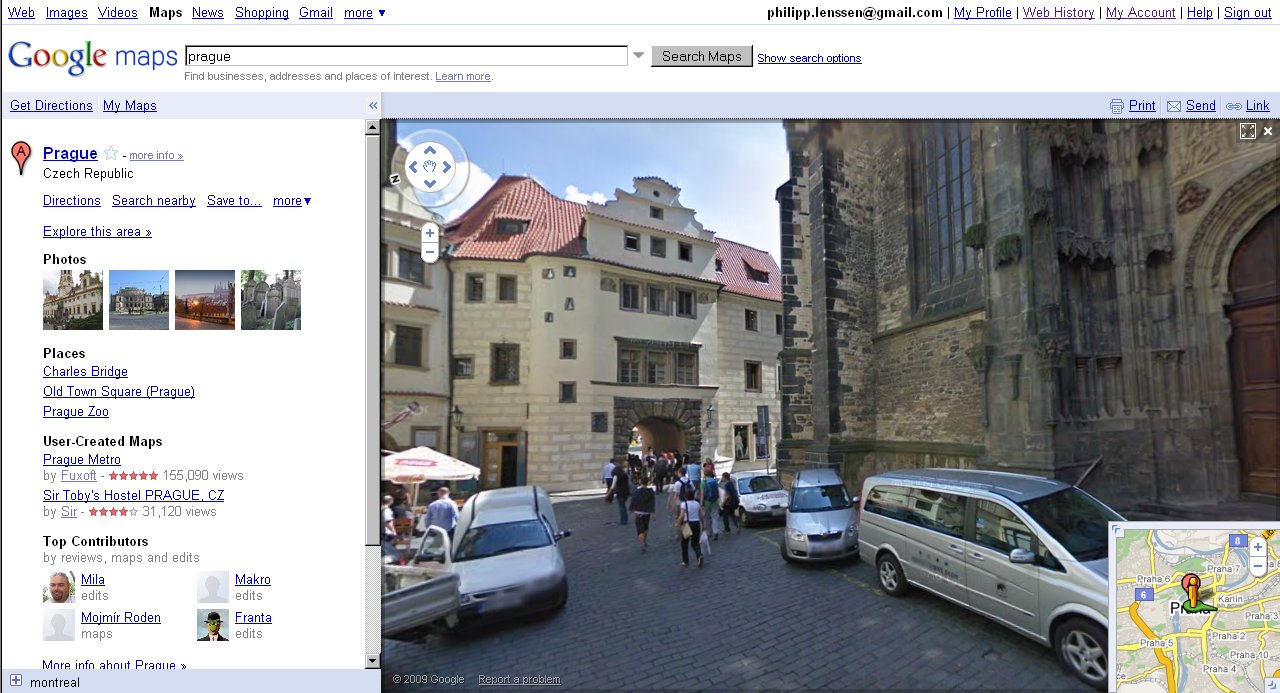
Google Street View for Canada, Czech Republic


Google has launched Street View imagery for Canada and the Czech Republic. Above are snapshots from Montreal and Prague.
[Thanks TomHTML!]
[By Philipp Lenssen | Origin: Google Street View for Canada, Czech Republic | Comments]

6 octobre 2009


69 Free (or low cost) Tools to Improve Your Website

http://www.bryaneisenberg.com/2009/09/free-tools-to-improve-your-website/

Flash Finds a Way Onto the iPhone

max09_640x360_vasava

Many people thought that Apple’s reluctance to join the Open Screen Project meant no Flash Player for the iPhone, despite the other smartphones gearing up for Adobe’s patented technology.

In one of many press releases issued today, Adobe announced that “Adobe Flash Professional CS5 will enable developers to create rich, interactive applications for the iPhone and iPod Touch.” A public beta version of this will be available by the end of this year, opening up app development to millions of developers.

This announcement came during the keynote presentation of Adobe MAX, a worldwide developer conference, along with a sneak peak demonstration on how developers can utilize the new technology to export applications for the iPhone.

There are currently several applications in the App Store that have been created with Flash technology, and Adobe said there were a number of other apps pending approval. Those of us waiting for “all the parts of the Internet” that the iPhone once promised are still left wanting, however. The San Jose based company said: “The Apple iPhone SDK license terms do not allow runtime interpreted code, so Adobe is not able to deliver Flash Player in Safari on the iPhone without support from Apple.”


Related Posts


Original story by AppAdvice.com | Flash Finds a Way Onto the iPhone