24 septembre 2009


Test-Driven Development With Refactoring

Success on an Agile project relies heavily on the people in the trenches. Developers, testers, and product managers focused together, can deliver astonishing accomplishments in a short amount of time. Extraordinary results require discipline, motivation and alignment. Test Driven Development (TDD) and Refactoring creates the momentum to help developers organically adapt to an endlessly changing world. In this hands-on tutorial, you will see and try simple TDD and Refactoring exercises. The session is split in two videos.


http://www.testingtv.com/2009/09/24/test-driven-development-with-refactoring/

23 septembre 2009


20 Tutorials on CSS Graph and Charts

20 Tutorials on CSS Graph and Charts

Sample iPhone Apps with JSF

These iphone apps are deployed online so you can test them with your iphone or any other webkit based mobile web browser. Additionally here's a screencast explaining how these apps can be created with a couple of steps. 


From http://www.theserverside.com/news/thread.tss?thread_id=57930

Google Sync: Now with push Gmail support

"Earlier this year, we launched Google Sync which allows you to synchronize your Gmail Contacts and Google Calendar with your iPhone, Windows Mobile, and S60 devices. Today, we're adding Gmail support to Google Sync for iPhone, iPod Touch and Windows Mobile devices.

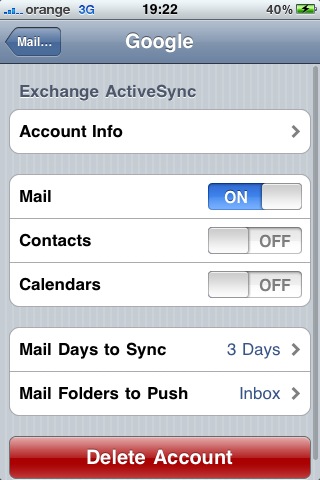
Using Google Sync, you can now get your Gmail messages pushed directly to your phone. Having an over-the-air, always-on connection means that your inbox is up to date, no matter where you are or what you're doing. Sync works with your phone's native email application so there's no additional software needed. Only interested in syncing your Gmail, but not your Calendar? Google Sync allows you to sync just your Contacts, Calendar, or Gmail, or any combination of the three.


To try Google Sync, visit m.google.com/sync from your computer. If you're already using Google Sync, learn how to enable Gmail sync. Since push Gmail has been a popular request on our Product Ideas page and Help Forum, we look forward to hearing your feedback, so drop us a line and let us know how it's working or what you'd like to see next.

Douglas Gresham, Software Engineer, Google Mobile

Update at 8:20am: We jumped the gun on this post. The new feature should be rolling out in a few minutes.

Push Gmail for iPhone and Windows Mobile

"Two years after Yahoo surprised everyone by launching push Yahoo Mail for iPhone, Google adds push support for Gmail. And it's not limited to iPhone, it also works for Windows Mobile devices.

'Push e-mail is used to describe e-mail systems that provide an 'always-on' capability, in which new e-mail is instantly and actively transferred (pushed) as it arrives by the mail delivery agent (MDA) (commonly called mail server) to the mail user agent (MUA), also called the e-mail client. E-mail clients include smartphones and, less strictly, IMAP personal computer mail applications,' explains Wikipedia.

Instead of periodically fetching new messages, mail clients receive notifications as soon as there's a new message. Applications no longer waste bandwidth and you're able to read a message shortly after it was sent.

'Using Google Sync, you can now get your Gmail messages pushed directly to your phone. Having an over-the-air, always-on connection means that your inbox is up to date, no matter where you are or what you're doing. Sync works with your phone's native email application so there's no additional software needed.'

If you're already using Google Sync to synchronize your calendars and contacts, it's easy to edit the settings and enable it for mail, as well.


Unfortunately, there are some downsides to this feature, so you should only enable push support for Gmail if you really need it. 'Depending on your device, any push connection may use more power than fetching content at intervals. In some cases the difference in power usage may have a noticeable impact on your phone's battery life,' mentions Google.

Google explains the difference between using Google Sync, IMAP and Gmail's web application for mobile phones. 'Google Sync synchronizes Gmail, Google Calendars, and contacts with your mobile phone. You can use the Google services directly in the built-in Mail, Calendar and Contacts application on your phone. Google Sync offers some advantages over using IMAP on your phone. Most importantly, it allows for content to be pushed to your phone within seconds after changes occur on the server. On the other hand, using Gmail Drafts from your phone is not possible via Google Sync. On iPhone and iPod Touch devices, the Gmail web application offers the most comprehensive features and the best experience for most users. But for users who prefer using the native Mail application, Google Sync offers an alternative way to access their Gmail account.'

While Google Sync is also available for Blackberry, Nokia S60 devices and other mobile phones, push Gmail only works for Windows Mobile and iPhone devices that support ActiveSync. At least for now.


The dirty secret of pair programming


Pair programming is one of the more controversial extreme programming practices. Having two people work on the same piece of code at the same time looks very unpractical and inefficient to someone not familiar with this practice. Pair programming proponents like me are usually quick to point out the benefits like improved quality, less rework, better communication and better knowledge sharing within teams but I think the biggest reason pair programming works is usually kept quiet.

People work harder when there is someone looking over their shoulder.
I'm going to be completely honest with you here. When I work alone I spend a considerable amount of time surfing the web, reading email, twittering (you can follow me at @mendelt) getting coffee and talking to coworkers. This means I'm spending less time working but it also means I'm constantly interrupting myself during the time I am doing work making me even less productive.
Now we don't tell our managers this because it wouldn't do anyone much good, the problem is a bit more complex than just people slacking off. What I've observed is most people have a hard time pacing themselves. We do really focused work for five minutes and then take a break. Unfortunately breaks have a habit of taking more time than they should and productivity goes out the window.
To solve this problem we need a way to maintain a sustainable pace. Pair programming is a way to do just this. Forcing yourself to explain what you do to your pair is a great way to maintain a sustainable pace and work a bit harder.

From http://agilesoftwaredevelopment.com/blog/mendelt/dirty-secret-pair-programming

The 7 Software Development Wastes - Lean series Part 6 - Delays

Introduction
Interestingly, this weeks blog covers the 6th waste - Delays - as identified in Lean. How appropriate after the long delay since my last blog post on Task Switching. Herein lies an example of what Delays in software development can cause.  Delays introduce discontinuity and trigger additional wastes already covered like Relearning. It's important in any process, including software, to have continuity. This reduces cycle time and minimizes other wastes like Relearning, Task Switching etc.
The rest of this series can be found here: Part 1, Part 2, Part 3, Part 4, Part 5.
Focus on the end-to-end process, not individuals
It's important to identify Delays early on and try to rectify them as soon as possible in order to maximize team productivity. It's interesting... I have been reading many interesting threads on the Agile forums lately about measuring developer productivity, team productivity etc. Managers/executives have us focus our efforts and attention on individuals instead of looking at the end-to-end process to find the real issues that address productivity and enhance team effectiveness.
It's actually unbelievable to me that organizations get trapped like this. Always thinking that Developers are the bottleneck. If we learn from what Lean teaches us, simple value stream mapping can uncover the real gems that can increase productivity.
Reducing delays between sprints
It's important to ensure that the value stream is tuned for maximum efficiency where there are little to no delays at any point in the process. For example, yesterday someone posted a question on one of the forums asking if it's possible to not have delays between sprints. Well of course it is possible but it takes hard work to get this right. You have to ensure that the backlog is properly groomed. So you need an effective PO who understands the market, the client etc. You need well written stories. You need estimates from developers early so the PO can make decisions ahead of the planning meeting. It's all about designing delays out of the system so that there are smooth hand-offs at all the transition points. And it's worth mapping this end-to-end process and identifying delays at each of these points.
Common Delays
So what are some of the more common delays you can look for and what can you do to avoid them?
1. Project approvals - waiting for projects to get approved is the most cardinal of all sins as this usually has handfuls of developers sitting around twiddling their thumbs and is a blatant disrespect for peoples time. Coupled with this is the fact that waiting causes dissatisfied and disgruntled employees and only serves to ruin the culture in an organization
2. Waiting for a proper prioritized list of requirements - so that work can get started.
3. Waiting for resources to become available - generally impacts projects significantly. This one is not necessarily an easy one to solve as there are generally budgetary concerns. But this then begs the question - is the company taking on too much? You can't be successful if you're not focused and properly staffed.
4. Change approval processes - well you don't want to hear my opinion on this. Suffice to say, these processes need to be eliminated entirely. And all Agile processes inherently solve these problems. Shortening Sprints helps big time.
5. Increases in work-in-progress - The more work-in-process, the more developers have to wait before they can deploy their code to production.
6. Delays getting client to sign-off on acceptance tests - We have a services business and we find that this is a huge problem for our organization. Not getting sign-off is just a liability for the company as you're not getting paid until you get sign-off
Take the time to assess where delays are occurring and I can guarantee you that the effort spent doing this is hugely beneficial to your productivity, efficiency and overall bottom line.


From http://blog.agilebuddy.com/2009/09/the-7-software-development-wastes-lean-series-part-6-delays.html

22 septembre 2009


Test Driven Development: Ten Years Later

http://www.infoq.com/presentations/tdd-ten-years-later

21 septembre 2009


Enhancing User Interaction With First Person User Interface

Though many computer applications and operating systems make use of real-world metaphors like the desktop, most software interface design has little to do with how we actually experience the real world. In lots of cases, there are great reasons not to directly mimic reality. Not doing so allows us to create interfaces that enable people to be more productive, communicate in new ways, or manage an increasing amount of information. In other words, to do things we can’t otherwise do in real life.

But sometimes, it makes sense to think of the real world as an interface. To design user interactions that make use of how people actually see the world -to take advantage of first person user interfaces.

First person user interfaces can be a good fit for applications that allow people to navigate the real world, “augment” their immediate surroundings with relevant information, and interact with objects or people directly around them.

Navigating the Real World


The widespread integration of location detection technologies (like GPS and cell tower triangulation) has made mobile applications that know where you are commonplace. Location-aware applications can help you find nearby friends or discover someplace good to eat by pinpointing you on a map.

When coupled with a digital compass (or a similar technology) that can detect your orientation, things get even more interesting. With access to location and orientation, software applications not only know where you are but where you are facing as well.


This may seem like a small detail but it opens up a set of new interface possibilities that are designed from your current perspective. Consider the difference between the two screens from the TomTom navigation system shown below. The screen on the left provides a two-dimensional, overhead view of a driver’s current position and route. The screen on the right provides the same information but from a first person perspective.


This first person user interface mirrors your perspective of the world, which hopefully allows you to more easily follow a route. When people are in motion, first person interfaces can help them orient quickly and stay on track without having to translate two-dimensional information to the real world.


TomTom’s latest software version goes even further toward mirroring our perspective of the world by using colors and graphics that more accurately match real surroundings. But why re-draw the world when you can provide navigation information directly on it?

Nearest Tube is a first person navigation application that tells you where the closet subway station is by displaying navigation markers on the real world as seen through your phone’s camera.


As you can see in the video above, the application places pointers to each subway station in your field of vision so you can quickly determine which direction to go. It’s important to note, however, that the application actually provides different information depending on your orientation.

When you hold the phone flat and look down, a set of arrows directs you to each subway line. Holding the phone in front of you shows the nearest subway stations and how far away they are. Tilting the phone upwards shows stations further away from you.


Making use of the multiple perspectives naturally available to you (looking down, looking ahead, looking up) is an example of how first person interfaces allow us to interact with software in a way that is guessable, physical, and realistic. Another approach (used in Google Street View) is to turn real world elements into interface elements.

Street View enables people to navigate the World using actual photographs of many major towns & cities. Previously, moving through these images was only possible by clicking on forward and back arrows overlaid on top of the photos. Now, (as you can see in the demo video below) Street View allows you to use the real-world images themselves to navigate around. Just place a cursor on the actual building or point on the map that you want to view and double-click.


Augmented Reality


Not only can first person user interfaces help us move through the world, they can also help us understand it. The information that applications like Nearest Tube overlay on the World can be thought of as ÒaugmentingÓ our view of reality. Augmented reality applications are a popular form of first person interfaces that enhance the real world with information not visible to the naked eye. These applications present user interface elements on top of images of the real world using a camera or heads up display.


For example, an application could augment the real world with information such as ratings and reviews or images of food for restaurants in our field of vision. In fact, lots of different kinds of information can be presented from a first person perspective in a way that enhances reality.

IBM’s Seer application provides a way to navigate this year’s Wimbledon tennis tournament more effectively. Not only does the application include navigation tools but it also augments your field of vision with useful information like the waiting times at taxi and concession stands.


Wikitude is an application that displays landmarks, points of interest, and historic information wherever you point your phone’s camera. This not only provides rich context about your surroundings, it also helps you discover new places and history.


These augmented reality applications share a number of design features. Both IBM Seer and Wikitude include a small indicator (in the bottom right corner of the screen) that lets you know what direction you are facing and how many points of interest are located near you. This overview gives you a quick sense of what information is available. Ideally, the data in this overview can be manipulated to zoom further out or closer in, adjust search filters, and even select specific elements.

Wikitude allows you to manage the size of this overview radius through a zoom in/out control on the left side of the screen. This allows you to focus on points of interest near you or look further out. Since it is dealing with a much smaller area (the Wimbledon grounds), IBM Seer doesn’t include (or need) this feature.

In both applications, the primary method for selecting information of interest is by clicking on the icons overlaid on the camera’s view port. In the case of IBM Seer, different icons indicate different kinds of information like concessions or restrooms. In Wikitude, all the icons are the same and indicate information of interest and distance from you. Selecting any of these icons brings up a preview of the information. In most augmented reality applications, a further information window or screen is necessary to access more details than the camera view can display.

When many different types of information can be used to augment reality within a single application, it’s a good idea to allow people to select what kinds of information they want visible. Otherwise, too many information points can quickly overwhelm the interface.

Layar is an augmented reality application that allows you to select what kinds of information should be displayed within your field of vision at any time. The application currently allows you to see houses for sale and rent, local business information, available jobs, ATM locations, health care providers, and more. As the video below highlights, you can switch between layers that display these information points by clicking on the arrows on the right and left sides of the screen.


Layar also provides quick access to search filters that allow you to change the criteria for what shows up on screen. This helps narrow down what is showing up in front of you.

Interacting with Things Near You


First person user interfaces aren’t limited to helping you navigate or better understand the physical space around you -they can also enable you to interact directly with the people and objects residing within that space. In most cases, the prerequisite for these kinds of interactions is identifying what (or who) is near you. As a result, most of the early applications in this category are focused on getting that part of things right first.

One way to identify objects near you is to explicitly provide information about them to an application. An application like SnapTell can identify popular products like DVDs, CDs, video games, and books when you take a picture of the product or its barcode. The application can then return prices, reviews, and more to you.


This approach might eventually also be used to identify people as illustrated in the augmented ID concept application from TAT in the video below. This proposed application uses facial recognition to identify people near you and provides access to digital information about them like their social networking profiles and updates.


While taking pictures of objects or people to get information about them is a more direct interaction with the real world than typing a keyword into a search engine, it only partially takes advantage of first person perspective. Perhaps it’s better to use the objects themselves as the interface.

For example, if any of the objects near you can transmit information using technologies like RFID tags, an application can simply listen to how these objects identify themselves and act accordingly. Compare the process of inputting a barcode or picture of an object to the one illustrated in this video from the Touch research project. Simply move your device near an RFID tagged object and the application can provide the right information or actions for that object to you.


This form of first person interface enables physical and realistic interactions with objects. Taking this idea even further, information can be displayed on the objects themselves instead of on a device. The 6th Sense project from the MIT Media Lab does just that by using a wearable projector to display product information on the actual products you find in a library or store.


Though some of these first person interfaces are forward-looking, most are available now and ready to help people navigate the real world, “augment” their immediate surroundings, and interact with objects or people directly around them. What’s going to come next is likely to be even more exciting.

The next time you are working on a software application, consider if a first person user interface could help provide a more natural experience for your users by bringing the real world and virtual world closer together.

About the Author


LukeW is an internationally recognized Web thought leader who has designed or contributed to software used by more than 600 million people. He is currently Senior Director of Product Ideation & Design at Yahoo! Inc., author of two popular Web design books, and a top-rated speaker at conferences and companies around the world. You can follow Luke on Twitter at lukewdesign or by using RSS.


© Luke Wroblewski for Smashing Magazine, 2009. |

How to Get Started with iPhone Dev

http://www.webdesignerdepot.com/2009/05/how-to-get-started-with-iphone-dev/