15 septembre 2009


Google's Data Liberation Site


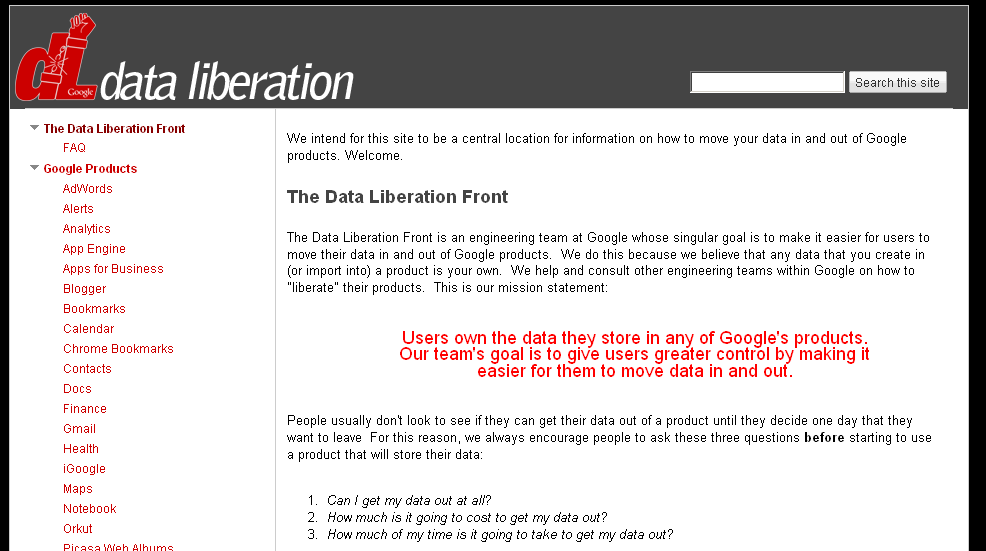
Google is emphasizing their proclaimed goal to let you easily import and export your Google data when moving services via a new site – DataLiberation.org*. The mission statement from the Data Liberation Front – named after a Monty Python skit about the Judean People’s Front – is that “Users own the data they store in any of Google’s products. Our team’s goal is to give users greater control by making it easier for them to move data in and out.” Thus the team wants to “make it easier for users to move their data in and out of Google products,” they say.


In a blog post Google clarifies that “a liberated product is one which has built-in features that make it easy (and free) to remove your data from the product in the event that you’d like to take it elsewhere.” When users are locked in, on the other hand, Google says there’s a strong temptation on the product makers side “to be complacent and focus less on making your product better.” Google says they’ve already “liberated” over half of all Google products – like Blogger and Gmail – and in the future want to liberate Google Sites and Google Docs as well.


Any company believing their software can beat competing software when fairly compared does well to push for a fair market, where switching is easy. By releasing export features for their own products they don’t only take away from fears people may have when contemplating a switch to their software. They also create an environment that pushes other companies (like Microsoft in particular) to release export features of their own, helping users leave competing products. That type of environment is a win for users.


Time will tell if Google’s own replacement of the lock-in strategy will become the strategy of heavily cross-connecting its services: for instance, connecting Gmail with Google Docs, Google Calendar with Google Maps, Google search with Blogger, and so on (all things which happen or did happen in the past). Because that too can convince a company to “focus less on making your product better”... as the company can then try switch over their massive user base, if they have one, through the effects the cross-connection comfort brings to users (say you may slightly prefer Acme Docs over Google Docs, but your favorite email client Google Mail just doesn’t offer to open attachments in Acme Docs, so you find sticking with Acme too bothersome to justify its slight advantage). Once we’re truly looking at an OS inside the browser, perhaps we’ll also want a way to liberate our online OS file type associations.


[Thanks DPic and Niniane!]


*I can’t directly access that site from China, as seems to be the case with (several? all? some?) newish domains.
[By Philipp Lenssen | Origin: Google's Data Liberation Site | Comments]

Google Fast Flip

"Google Labs has been very active lately. The most recent service launched in Google Labs is Fast Flip, a visual version of Google News that encourages serendipitous discoveries.

'Fast Flip is a new reading experience that combines the best elements of print and online articles. Like a print magazine, Fast Flip lets you browse sequentially through bundles of recent news, headlines and popular topics, as well as feeds from individual top publishers. As the name suggests, flipping through content is very fast, so you can quickly look through a lot of pages until you find something interesting,' explains Krishna Bharat, the man behind Google News.

The homepage shows thumbnails of the news articles and clicking on the thumbnail loads a screenshot of the article. You can't read the entire article in Google Fast Flip, so you need to visit the original source. The service shows articles from a small number of sources, including BBC News, New York Times, Newsweek and Slate.


The nice thing is that you can quickly go to the next preview by clicking on the blue right arrow or by using the right-arrow key. The service provides recommendation based on the articles you read, you email or explicitly like. There's also a mobile version optimized for iPhone and Android phones.

How to Make Your Own iPhone/iPod Touch Dock

Where do you charge your iPhone? For me, it’s on my bedside table in the Apple Universal Dock, which quite frankly is one of the best accessories you can buy for your iPhone. But what if you are on a budget and you don’t want to shell out $50 for a dock (especially after spending $18,000 on data roaming)? Well, the next best thing is to make your own!

How to Make Your Own iPhone Dock Out of Paper

I haven’t tried this but it’s definitely a project for an upcoming rainy Vancouver Sunday. The following is a full DIY print out with a full video tutorial on how to create your own iPhone dock. It actually looks pretty cool and sturdy enough to support your iPhone.

It’s the brainchild of French industrial designer, Julien Madérou. Here’s how to make this dock yourself:


1. Click here to download the dock template (you print it out; detailed instructions included)

2. Watch the following video (it’s hosted by Vimeo, so you won’t be able to view it on your iPhone):


Iphone Paper Dock / Stand from Dessine moi un objet on Vimeo.

I absolutely love how this DIY iPhone dock includes room for the USB charging cable to rest–brilliant! If you’re looking for a great gift to give to your iPhone buddies, make a few of these on some thicker construction paper and pass ‘em around. Everyone will be happy.

Anyone tried this yet? Definitely a fun little project especially if you’re bored at the office…

[via iClarified]

14 septembre 2009


Dual SIM Card adaptor Platinum 3G HSDPA


With Simore Platinum, go up a gear
Platinum is the latest generation intelligent device enabling you to install two SIM cards in one mobile phone. Dual SIM Card is universal and installed directly into the slot of your SIM card.
Platinum has been developed to support 3G and HSDPA networks and designed to be easily integrated into all phones, even those with an extremely thin SIM card slot such as the Apple iPhone, HTC, Nokia, LG, Samsung, Blackberry, etc… This brand new Dual SIM Card supports USIM and SIM cards from all mobile phone operators and allows users to take full advantage of Internet access and video connections via 3G networks – UMTS – WCDMA – HSDPA (High Data transfer speed)
Platinum guarantees connections to GSM, GPRS, EDGE, CDMA, UMTS, WCDMA, HSDPA
- Once inserted into your mobile, the Simore menu will automatically appear in the main menu of your phone. (You can also bring up the menu by dialling the Simore keyboard shortcut # 99) *
- The Simore menu allows you to manage your two numbers and to define your settings.
- You can switch from one number to the other in two clicks.
To achieve high quality products, Simore uses innovative and futuristic designs, together with the latest flexible printed circuit board technologies (Technology CoF)
Our focus on manufacturing quality, combined with excellent product components, allows us to create “best in class” products.
The micro-controller (high capacity) chip is now covered with film protection to ensure a safe use during handling.
Choose quality and enjoy a top-of-the-range product.
Simore Platinum has an active internal memory allowing you to store, manage and protect your contacts and personal information (secret agenda, confidential directory, secret SMS, etc. ..).
This Dual SIM Adaptor includes an encrypted SMS function which allows you to send and receive confidential information.
To use the “SMS encrypted” the mobile phone must support the storing or copying of received SMS messages in the SIM card memory.
The Platinum version requires the cutting of your SIM cards. Our system is reversible. We provide in every pack two recovery tools that enable you to restore your SIM cards to their original form and place each of them into two separate phones.
Integrate 2 SIM cards in your mobile
Certified ISO – 7816
Compatible with both GSM and 3G mobile
Multi-language menu (ENG-FRE-GER-ITA-SPA)
Manual switch
Automatic switch (flexible duration)
Name and display the active SIM card
Protected internal memory
Secret agenda secured by a password
Secret directory secured by a password
Send and receive encrypted SMS
Secured storage of encrypted SMS
Support GSM network
Support GPRS network
Support EDGE network
Support CDMA network
Support UMTS – 3G network
Support WCDMA network
Support HSDPA network
Shortcut function


http://www.mobil365.se/2009/09/13/dual-sim-card-adaptor-platinum-3g-hsdpa/

The BookArc Turns Your Macbook into a Desktop

bookarc

A few weeks ago, we told you about the Backpack shelf for you iMac. Now we bring you the BookArc, a sleek and aesthetically pleasing product acts as a desktop stand for your Macbook.

Apart from freeing up valuable desk space, the BoookArc turns your Macbook into a mini-desktop tower. This is capable of holding any Macbook design - from the Macbook Air to the 17-inch Macbook Pro - thanks to its three different sized, scratch-free, silicone cushions. It has silicone footpads for extra grip and to protect your desk surface. Twelve South, the designers of this product, also claim that this can speed up the performance of your Macbook. Free Shipping for a limited time at the price of $ 49.99. If you’re with a team or company buying with a group of 6, get a discount at $ 249.99 for a 6-pack.

[ Source ]

11 septembre 2009


You might as well jump!

It's time to announce another Blogger Birthday feature! Many users have been asking for an easy way to implement "Read more" links on their blog's index page. In fact, for years bloggers have been implementing "Read more" jump breaks themselves by manually editing their HTML --- a process that was complicated and error prone.

Today we are excited to announce our latest birthday present:Jump Breaks.

With Jump Breaks you can show just a snippet of your post on your blog's index page. Blogger will insert a "Read more" link to the full post page where your readers can keep reading.


How to Access Gmail When It’s Down [Gmail]

Last week's Gmail outage is just the latest in a long series of outages in our favorite webmail application, but you don't have to let that stop you from accessing your email and getting things done.

Access Gmail Through Alternate Modes

Just because the Gmail web interface went down doesn't mean that Gmail is entirely down—often you can continue to access your account using one of the alternate web interfaces, which often are still accessible even when the regular web interface goes down.
Here's a quick look at each alternate method, one at a time, from the simplest to the most complex. (The more complex solutions are often better long-term solutions, while the simpler solutions are probably the easiest if Gmail just went down and you haven't already prepared for it.)

Try Plain HTML

Your best bet is to bookmark the link for the Plain HTML version of Gmail (or just bookmark this post), so you can quickly switch to this alternate mode if Gmail is giving you trouble loading. http://mail.google.com/mail/?ui=html . It doesn't have all the fancy features that regular old Gmail does, but it can do the job just fine in a pinch.

Use Safe Mode

If you use a lot of different Gmail Labs features, you might find that some of them will conflict with each other, or possibly cause Gmail to stop working. You can use the Safe Mode link to disable all the Labs features and hopefully get Gmail back up and running again. Just visit this URL: http://mail.google.com/mail/?labs=0. Some people recommend using the older version or bypassing browser checking links, but they won't let you access the Labs settings.

Use the Mobile Versions

You can access the mobile phone versions of Gmail from your desktop computer, although they are very stripped down and lacking features. You'll be better off with the Plain HTML version, but in a pinch you can try the regular mobile version http://mail.google.com/mail/?ui=mobile or the more user-friendly iPhone version http://mail.google.com/mail/x/gdlakb-/gp/.

Use the iGoogle Gadget

We've seen numerous comments and emails from readers during Gmail outages recommending that the excellent Gmail gadget for iGoogle usually still works during a Gmail downtime. If you aren't an iGoogle user, you can still use the gadget by simply browsing to the following URL: http://www.google.com/ig/gmailmax

Use Gmail Offline Access

If you haven't already checked out the Google Gears-powered offline mode for Gmail, this is a must-use for anybody that really depends on Gmail access. You can continue to use your email whether Gmail is running or not, or even when your own internet goes out. It's not perfect, since it doesn't store every single email in your inbox locally, but it does store enough email to be a great solution.
The biggest benefit in daily use is the Flaky Connection Mode, which is a hybrid between the offline and online modes, and makes Gmail response time much faster for everyday email tasks for those on slower connections. In this mode, Gmail effectively works like a desktop client.

Access Gmail Through IMAP / POP3

During the last Gmail outage, IMAP and POP3 access weren't affected at all, so those using a desktop or mobile client to access their email were still able to send and receive without even knowing there was an issue. Even if you use the web interface as your primary method of email access, it's a good idea to at least keep a Thunderbird installation setup with IMAP access to your email in a pinch.
We've already got you covered with a complete guide to setting up Thunderbird as the ultimate Gmail IMAP client, but since then, setting up Gmail in Thunderbird has turned into an easy process, requiring only a few clicks through the account settings. If you are an Outlook user, you can follow a detailed guide I've written to set up IMAP in Outlook 2007. If you've got a mobile phone, the Gmail Help site has instructions on setting up just about any smart phone with IMAP access to your email. If you really want to prove your nerd credentials, you can even access your Gmail from the command line.

Prepare For the Next Outage

Gmail doesn't have to go down globally for your email access to be cut off—your internet could go down, or your account could even be disabled. Whatever the case, it's a good idea to have a backup plan just in case the worst should happen.
We've got you covered with a number of methods for backing up your Gmail, starting with the really obvious solution of just using Thunderbird to back up your email with POP access, but you can backup your email with Fetchmail on Windows, Getmail on Linux, the standalone Gmail Backup tool, or even use Google Groups to backup your Gmail account.
What email accessing workaround, if any, worked for you during the last Gmail outage? Let us know in the comments.
The How-To Geek nervously wore the letters off the F5 key during the last Gmail outage, and hopes it doesn't happen again—Ever! His geeky articles can be found daily here on Lifehacker, How-To Geek, and Twitter.

The 7 Software Development Wastes - Part 6 - Delays

Introduction

Interestingly, this weeks blog covers the 6th waste - Delays - as identified in Lean. How appropriate after the long delay since my last blog post on Task Switching. Herein lies an example of what Delays in software development can cause. Delays introduce discontinuity and trigger additional wastes already covered like Relearning. It's important in any process, including software, to have continuity. This reduces cycle time and minimizes other wastes like Relearning, Task Switching etc.

Focus on the end-to-end process, not individuals

It's important to identify Delays early on and try to rectify them as soon as possible in order to maximize team productivity. It's interesting... I have been reading many interesting threads on the Agile forums lately about measuring developer productivity, team productivity etc. Managers/executives have us focus our efforts and attention on individuals instead of looking at the end-to-end process to find the real issues that address productivity and enhance team effectiveness.

<!--break-->

It's actually unbelievable to me that organizations get trapped like this. Always thinking that Developers are the bottleneck. If we learn from what Lean teaches us, simple value stream mapping can uncover the real gems that can increase productivity.

Reducing delays between sprints

It's important to ensure that the value stream is tuned for maximum efficiency where there are little to no delays at any point in the process. For example, yesterday someone posted a question on one of the forums asking if it's possible to not have delays between sprints. Well of course it is possible but it takes hard work to get this right. You have to ensure that the backlog is properly groomed. So you need an effective PO who understands the market, the client etc. You need well written stories. You need estimates from developers early so the PO can make decisions ahead of the planning meeting. It's all about designing delays out of the system so that there are smooth hand-offs at all the transition points. And it's worth mapping this end-to-end process and identifying delays at each of these points.

Common Delays

So what are some of the more common delays you can look for and what can you do to avoid them?

1. Project approvals - waiting for projects to get approved is the most cardinal of all sins as this usually has handfuls of developers sitting around twiddling their thumbs and is a blatant disrespect for peoples time. Coupled with this is the fact that waiting causes dissatisfied and disgruntled employees and only serves to ruin the culture in an organization

2. Waiting for a proper prioritized list of requirements - so that work can get started.

3. Waiting for resources to become available - generally impacts projects significantly. This one is not necessarily an easy one to solve as there are generally budgetary concerns. But this then begs the question - is the company taking on too much? You can't be successful if you're not focused and properly staffed.

4. Change approval processes - well you don't want to hear my opinion on this. Suffice to say, these processes need to be eliminated entirely. And all Agile processes inherently solve these problems. Shortening Sprints helps big time.

5. Increases in work-in-progress - The more work-in-process, the more developers have to wait before they can deploy their code to production.

6. Delays getting client to sign-off on acceptance tests - We have a services business and we find that this is a huge problem for our organization. Not getting sign-off is just a liability for the company as you're not getting paid until you get sign-off

Take the time to assess where delays are occurring and I can guarantee you that the effort spent doing this is hugely beneficial to your productivity, efficiency and overall bottom line.

9 septembre 2009


TechPosters Archives Tech-Oriented Posters and Cheat Sheets [Cheat Sheets]

Whether you need a poster to use for a presentation or a cheat card to keep by your monitor, TechPosters has a sizable archive of posters, diagrams, reference charts, and cheat sheets.
The hundreds of entries at TechPosters span dozens of categories including everything from Access to XML and everything in between. Need keyboard shortcuts for Indesign? A visual representation of the Linux kernel? You'll find it at TechPosters.
If you find a particularly interesting document out of the bunch make sure to share a link to it in the comments below. Have your own favorite resource for cheat sheets and technical posters? Sound off in the comments.

iPhone and iPod touch OS 3.1 Available for Download [Downloads]

iPhone/iPod touch only: Apple today announced an update to iPhone OS 3.1 today, introducing a new 'Genius' recommendation feature for the App Store. bug fixes and performance boosters, and several other small but worthwhile updates.
It's also added a Ringtone section to the App Store on your device (for a whopping $1.29 a pop—which is why we recommend making them yourself [Windows guide; Mac guide]). Other than that, Apple's not promising a lot from this update other than support for the newly released iTunes 9, its new features (e.g., Genius Mixes), and a few other nice tweaks. Below is a quick look at some of the other most notable updates from the release notes:
  • Save video from Mail and MMS into Camera Roll (We'll believe the MMS saving when we finally see MMS)
  • Option to 'Save as new clip' when trimming a video on iPhone 3GS
  • Better iPhone 3G Wi-Fi performance when Bluetooth is turned on
  • Paste phone numbers into the Keypad
  • Anti-phishing features in Safari
  • Improved Exchange calendar syncing and invitation handling
Hit up iTunes, plug in your device, and click the Check for Updates button to get started on the 240+MB download.